Asus ROG Flow Z13 Kojima Edition – Design and Features
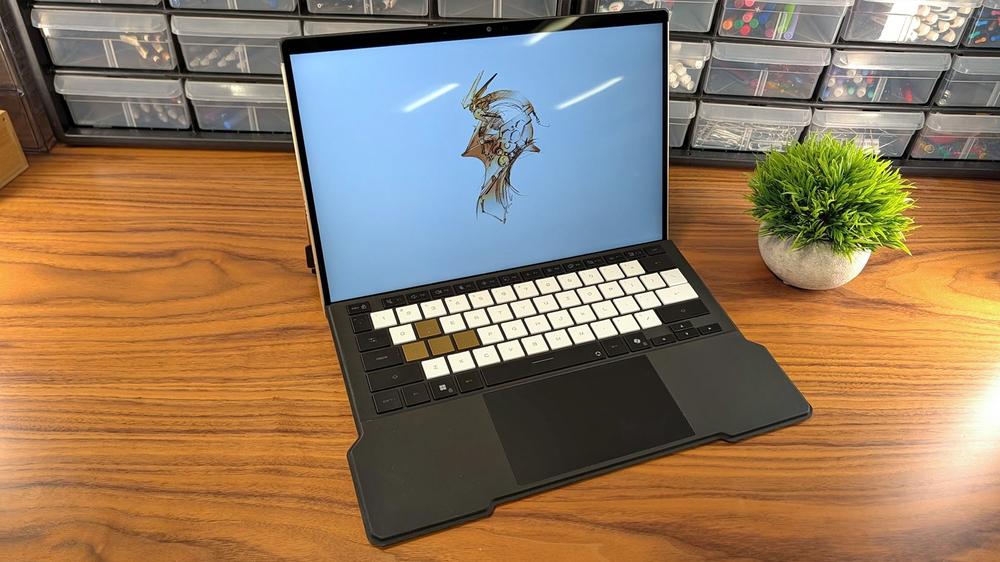
The KJP edition makes for a version of the Flow that you don’t need to be a fan of the game to appreciate. The gunmetal greys and black of the standard version have been replaced with muted gold and carbon fiber, the latter of which immediately draws the eye with its uniqueness. There are decals across its surface, labeling the ports and components hidden beneath, styled like schematics. If you had it side by side with the original, you might also notice that this version also has serrations along the sides, bringing to mind the hull of a spaceship.
Around the back are more creative touches. One heat vent is now part of a carbon fiber panel. The other has been laser etched into a pattern of dotted beams. It’s a design element that is easy to look at and take for granted but also makes the overall design stand out even more.
Display13.4-inch IPS touchscreen, 500-nitsResolution2,560 x 1,600 (16:10 aspect ratio)Refresh Rate180HzCPU / GPUAMD Ryzen AI Max+ 395 / Radeon 8060SMemory128GB LPDDR5X, 8,000HzStorage1TB NVMePorts1 x HDMI 2.1, 1 x USB 3.2 Gen 2 Type-A, 2 x USB4 Type-C (with DisplayPort and Power Delivery), 1 x microSD card reader, 1 x 3.5mm audio combo jackConnectivityWi-Fi 7, Bluetooth 5.4Camera13MP (rear), 5MP IR (front)Audio2 x 2-watt speakers with Smart Amp Technology, support for Dolby Atmos, Hi-Res Certified, 3-microphone arrayBattery70WHrsDimensions11.81" x 8.03" x 0.51" - 0.59"Weight2.76 poundsThe included keyboard folio case has also received a facelift. The keycaps are now topped white and gold (WASD), as well as normal black for the outer ring of keys. The typeface is also different, now more stencil-like to create a militarized feel. It’s all intentional and cohesive.
The laptop also comes with its own hardshell carrying case, similarly drawn from the game world. Together, the two are very well done and make a great set. If you’ve got cash to burn, Asus is also releasing a trio of peripherals and accessories as a part of the collaboration: the ROG Delta II-KJP gaming headset ($270), the ROG Keris II Origin-KJP gaming mouse ($170), and the ROG Scabbard II-KJP deskmat ($70). It’s enough to complete a full Death Stranding-themed gaming setup.
But as you can probably tell from the price of the peripherals, each set to $35-$40 higher than their non-Kojima counterparts, these limited editions don’t come cheap. That applies to the Flow Z13-KJP especially with a price tag of $3,700, a full $900 more than the regular Z13 with matching specs. That puts it firmly in collector territory, so it’s a good thing that it pulls off the details so well.
Outside of the new skin, what we have here is essentially the same exact Flow Z13 we got last year in its highest configuration. That means the flagship Ryzen AI MAX+ 395 with its powerful Radeon 8060S integrated GPU and a whopping 128GB of high speed memory (LPDDR5X, 8,000 MT/s). It comes with an easily replaceable M.2 storage drive and a 13.4 inch, 1600p, ROG Nebula IPS display that really feels like it should be OLED at this price. Still, it’s a vibrant and fast (180Hz) display, and won’t leave you worrying about burn-in.
Because it’s a 2-in-1, it can also function as a Windows tablet by detaching the keyboard case. It’s easy to do thanks to its magnetic latch and POGO pins, but it also stays securely in place to act as a folio cover. If you’d rather use it as a normal screen, the bottom half of its rear panel folds out on a secure hinge to act as a full-length kick stand. It’s solid. Beneath the hinge, there are more schematic decals and the M.2 SSD bay for easy storage expansion in the future.
The screen is beautiful and doesn’t seem to lag behind traditional gaming laptops in any way. It gets plenty bright at up to 500 nits, can run at 180Hz to reduce motion blur and input lag, and supports stylus, multi-point touch, and gesture control to fit both professional and creative work. It’s remarkably solid for gaming thanks to its high speed and resolution, and its smaller size makes dropping to 1200p for more demanding games less of a downgrade.
There are also plenty of ports, which is a major upgrade from many other 2-in-1s that add a pair of USB Type-Cs and call it a day. Here, Asus has landed the Flow Z13 closer to a traditional gaming laptop with two USB4 ports, a full-size USB 3.2 Gen 2 Type-A, a full-size HDMI 2.1, a headphone jack, a microSD card reader, and a power for a power adapter. You can connect peripherals directly, be it a controller or USB flash drive, and if you do need to connect a hub, it’s ready to deliver full speeds. And don’t forget eGPU support, if you’re inclined to improve gaming performance, is supported on either of its USB4 ports at full speed.
Of course, all of this is exactly the same as the original. It still supports Wi-Fi 7 and Bluetooth 5.4, it still has a 13MP rear camera and 5MP IR camera in the front for Windows Hello login. It still has the same 70Whr battery that will get you around nine hours of work and an hour or two of gaming, depending on your settings. And Armoury Crate is still where you turn to adjust performance and customization settings.
The only difference outside of looks, then, comes down to the included carrying case and its weight. Thanks to the different design and materials, the Kojima version is slightly heavier at 3.79 pounds when using the keyboard case (2.76 pounds without). The regular version is 3.51 pounds (2.65 without the keyboard), which makes the Z13-KJP about a quarter pound (127g). But then the adapter is 35 grams lighter, so the two are very close in weight too.
The takeaway? This is a top-spec normal Flow Z13, Kojima-fied, and the decision to pick it up is going to come down to how much that resonates with you.
Asus ROG Flow Z13 Kojima Edition – Benchmarks
Asus ROG Flow Z13 Kojima Edition – Performance
The performance numbers here shouldn’t be any different than the original and they’re not. I ran the same benchmarks side by side with the original. That sample was 64GB, but didn’t make a big impact on our roster of tests.
Everything I saw while testing the ROG Flow Z13-KJP could fall within margin or error or to a couple of common culprits, like unknown background processes that decide to fire up and run invisibly. Ultimately, though, this is a case of same hardware, same performance.
With the exception of the Kojima model’s 128GB of memory. For most people, this is simply overkill. Even 64GB of memory is overkill for almost every game out there. The GPU being integrated into the CPU gives it the unique ability to offer configurable VRAM. Theoretically, you could configure it to have more VRAM than the highest-tier desktop GPU, but in practice, that doesn’t offer great returns. For the foreseeable future, there won’t be any games that fully take advantage of the maximum VRAM the Z13-KJP can provide — but it is one of the ways the Ryzen AI Max+ 395 can offer better performance than integrated GPUs have been able to in the past. More video memory raises the ceiling on performance so VRAM doesn’t become a bottleneck.
Instead this massive RAM store seems aimed at everything but gaming. If you’re interested in running local LLMs, extra memory can be a major asset. Likewise, if you’re a creative professional, a system like this can take on demanding tasks like 3D modeling and rendering. That much memory also means that multitasking isn’t going to be kneecapped. With that much memory, you’re more likely to max out your processor before running out of RAM.
Since the performance of the systems for gaming and day to day tasks is just about identical, this review presents a unique opportunity for a long-term revisit of a device I’ve used most days of the week for the last nine months. What’s it like to live with the Flow for more than just a few week review window?
Overall, pretty darn great. Even with the keyboard case, it’s light enough to easily carry without feeling weighed down (though I do use a backpack and not the dedicated case that came with the Z13-KJP). That said, while compact, it’s closer to a laptop in thickness than a competitor like the Microsoft Surface. Asus has to make room for extra ports and better cooling and the trade-off is girth. I’ll take the ports any day of the week, but there’s no denying that the Flow feels chunky after a while.
The versatility of the device is its shining feature, though, and what really won me over. As a daily carry, it was just about perfect for someone like me. When I needed to work, the keyboard case worked flawlessly and offered an enjoyably tactile typing experience. The USB-A port is clutch for my one “must have” dongle and if I need more, the USB4 ports provide enough power for my Dockcase 10-in-1 Smart USB hub to power everything else. Either can be used for charging, too, so I often left my adapter at home.
If I need to present to a room, I am able to connect wirelessly to our main display, mirror screens, and then write in OneNote or slide through a presentation using a stylus. Not included, by the way, and like the OLED screen, I really feel like it should be here at this price.
When it comes to gaming, one of the most repeated Z13 facts is that its Radeon 8060S offers Nvidia RTX 4060 mobile levels of performance. That’s true, but adopting this device also means adopting a mindset of maximizing performance, just like you would with a handheld gaming system. Both use integrated graphics, so it makes sense. It’s a constant game of balancing settings, resolution, performance, and battery life.
In apples to apples tests, the Z13 and RTX 4060 mobile trade blows, but that’s only half the story. The Flow can take advantage of all of the major performance enhancers, like FidelityFX Super Resolution and Fluid Motion Frames (frame generation). The same is true of the RTX 4060 with DLSS and Nvidia’s own frame generation solution. But, the point is, it’s possible to play modern games at decent settings and resolutions while also reaping the size and weight benefits of an integrated GPU.
It’s also the ideal system for streaming games from the cloud. I subscribe to Nvidia GeForce Now and the service works impeccably with the Z13-KJP. If I turn the resolution down to 1080p and run high settings, Battlefield 6 hovers right around 60 FPS locally. If I stream it over GeForce Now, I can easily hit triple digits at full 1600p resolution. The screen sometimes became pixelated due to the emphasis on latency over fidelity for a first-person shooter. A slower paced game like Baldur’s Gate 3, though, didn’t have the same issue 99% of the time.
I have spent hundreds of hours with the Flow Z13 and dozens with the Kojima version. I love it, but can also say that it isn’t going to make sense for many people. Even the standard version demanded a premium for its 2-in-1 yet gaming-centered design, but with this version, you’re getting that premium plus a major hike thanks to the Kojima collaboration.
Make no mistake, this is a very cool machine with a unique and appealing design. But are you willing to spend $900 versus the original ($1,500 compared to the 64GB version) for a case and exterior modeled after Death Stranding? I suspect only the biggest fans would say yes, but to them I can also say that this is a really well-done version.
 Perplexity’s new Computer is another bet that users need many AI models