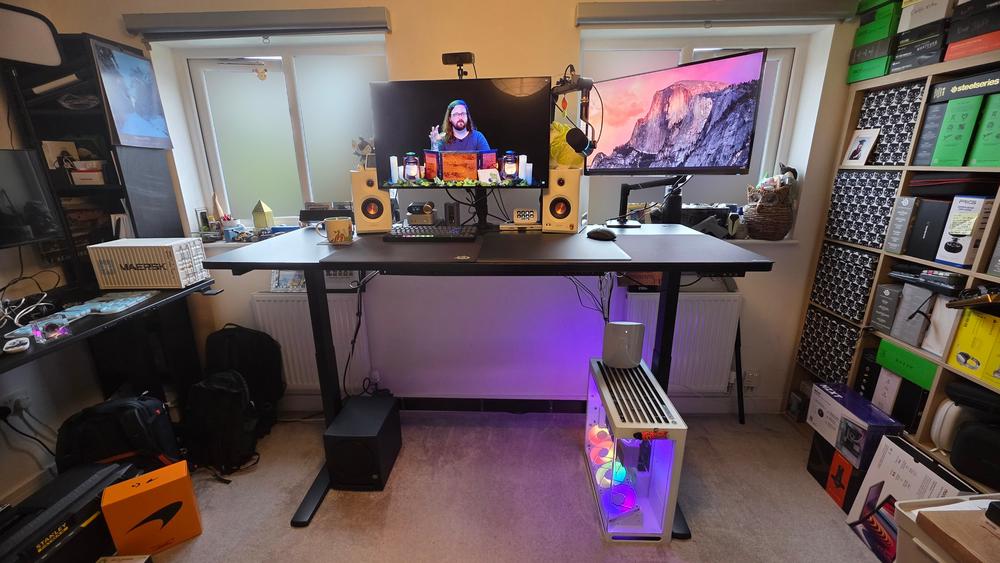
Corsair's Platform:6 Elevate gaming desk is robustly constructed and comes with powerful features, including an integrated rail system ideal for streamers and other content creators that need plenty of kit. Add on electric sit/stand motors, multiple cable storage areas and a streamlined assembly process, and the Platform:6 can be incredible for the right person. However, its top-tier pricing ($1399) and an all-or-nothing approach to modularity make it more of a specialist tool than an instant upgrade for the everyman.
I've been using the Platform:6 Elevate as my main work and gaming desk for the past two years, and I've found it at times maddening and at times marvellous. It offers perhaps the most potential in terms of mounting multiple accessories, with a huge amount of flexibility in terms of where and how items like monitors, cameras, lights and microphones are mounted, though it doesn't include an underslung PC mount like the Secretlab Magnus Evo I reviewed last month. Still, there's plenty here to appreciate, alongside a few design decisions that I've ultimately come to disagree with – even though I have no plans to trade the Platform:6 for another gaming desk in the near future.
Corsair Platform:6 Elevate – Design and Features
There are three variants of the Platform:6: the $999 base model, which is a fixed height; the $1399 Elevate model I tested, which adds electric sit/stand functionality; and the $1899 Creator Edition, which adds on a convenient and eye-catching peg board that floats above your monitors. Every variant is well built, with large t–shaped steel legs that provide a good degree of stability even when knocked, and a choice of 1in-thick black laminate (included) or 1.25in-thick dark walnut stain rubberwood ($100 extra) surfaces on the Elevate and Creator Edition models.
Like public transport in the UK, the key to each Platform:6 variant is its rail network. You get one large top crossbar that runs above and along the back of the desk, plus an extra smaller rail built into the left and right sides. The top rail works with the included dual monitor mount, which can handle screens up to 8kg each. That's sufficient for the average 32-inch or smaller screen – my 32-inch Alienware QD–OLED gaming monitor weighs 6kg, for context – but I tend to prefer separate monitor mounts for ultra-wide monitors or putting two 32-inch 16:9 displays next to each other, as it allows for more separation than the single central mount point of the included dual monitor mount can provide.
It's also possible to screw in additional items with the provided t-nuts and a choice of multi-mount or ball-mount adapters, which can be fixed in position or left to slide back and forth along the extruded aluminium tracks. The left and right corners of the top rail also include their own dedicated screw mounts, which are designed for the Creator Edition pegboard attachment (which can be purchased separately) but can also accommodate the previously mentioned adapters. Finally, the monitor arm also has its own central post, which is an ideal placement for a camera. That means there's plenty of scope to add on accessories from within Elgato's ecosystem, though at $50 a pop for an Elgato multi-mount, getting fully set up could be expensive.
The one issue with this arrangement is that many third-party friction-fit desk mounts don't work with the rail, especially for larger items like monitors where the mount overhangs the relatively narrow crossbar. Unfortunately, it's difficult or impossible to mount directly to the desk surface instead, as that top bar blocks the back side of the desk, while the rails on the sides mean that the edges there are often too thick to accommodate a mount. That locks you in to only a small proportion of the options available on a standard desk, and I ultimately removed the top bar so that I could mount my preferred separate monitor arms, mic arms and webcam stands where I wanted to. (The top bar was also starting to tilt forwards, which has been reported by other users online and requires a bit of faffing around to solve, so I went with the simpler option of not dealing with it.)
Cable management is also a focus, which is a relief given how much scope there is to add powered accessories like lights, cameras, microphones and so on. The small cable tidy in the centre of the desk is a little awkward to access, with a removable wooden cover that ended up directly underneath my third–party monitor mount, but it does provide a place to plug in USB-A and USB-C devices like keyboards or mice. This makes it easier to keep things looking relatively tidy without having to resort to fully wireless peripherals, though its small size and position towards the back of the desk made it difficult for me to make quick changes and eventually I only used it for my keyboard cable.
The cable organiser below the desk is a more generous size, and I found it easier to access. There's no integrated power point here, as there is on the Secretlab Magnus Evo, so you will have to route at least one power cable down one of the legs on your own, but there is a good amount of space in all directions to place my (comically oversized) UK power strips and the usual collection of USB, monitor and speaker cables. Being a tech reviewer means that I have a lot of powered accessories plugged into my PC at any one time, so having plenty of cable storage space is very important to me. The only downside is that the high back of the organiser means that sometimes cables can be difficult to push in from the top without getting snagged, but that's a relatiely minor concern.
Corsair also makes matching matte black three-way or six-way power outlets, which each include two USB ports (weirdly, one USB–C and one USB-A on the three-way option, and two USB-A on the six-way). One wasn't included in the parcels I received, so I bought my own to test out. It's perfectly serviceable, as you'd expect, though I found that the friction-fit mounting tended to loosen over time, especially as I was pushing it away from me when plugging cables in. Again, third-party options may be the most cost-effective route forward here, but the chunky matte black aesthetic does match the desk nicely.
As well as its more gaming-focused features, the Platform:6 is also just a massive desk. In fact, it's the largest gaming desk I've ever tested (of five in total), measuring a substantial 72 inches in width and 30 inches in depth, providing more than enough real estate for two desktop PCs and two monitors, plus speakers and other small peripherals.
If 72 inches of width isn't enough for your expansive gaming lair, you can also buy a pair of extensions for $200 that add an extra 24 inches or so, easily providing room for two or even three gaming setups on what is technically a single piece of furniture. However, you can't install these with a peg board on the same side; it's one or the other. On the other hand, if you want a smaller footprint, Corsair also sells the Platform:4, a shrunk-down, less-expensive version that measures 47 inches across but is otherwise nearly identical to the Platform:6.
Finally, the electric motors built into the Elevate and Creator Edition models work well, with your choice of left or right–mounted controls that include a height readout, dedicated up/down buttons, a save button and two numbered presets. As usual, if the desk detects resistance while moving, it will stop and quickly reverse course to avoid injury or damage, and this worked reliably in my testing. There's no dedicated switch to lock out the controls, and I did occasionally lean over in such a way that I accidentally pressed one of the buttons – which is always a bit shocking when it happens unexpectedly. However, in writing this review I did discover that it's possible to lock the controls by pressing and holding the save button, then pressing the down arrow, which does work as advertised.
 “Am I crazy here?”: Dad stunned after 2 Chipotle bowls cost him $52