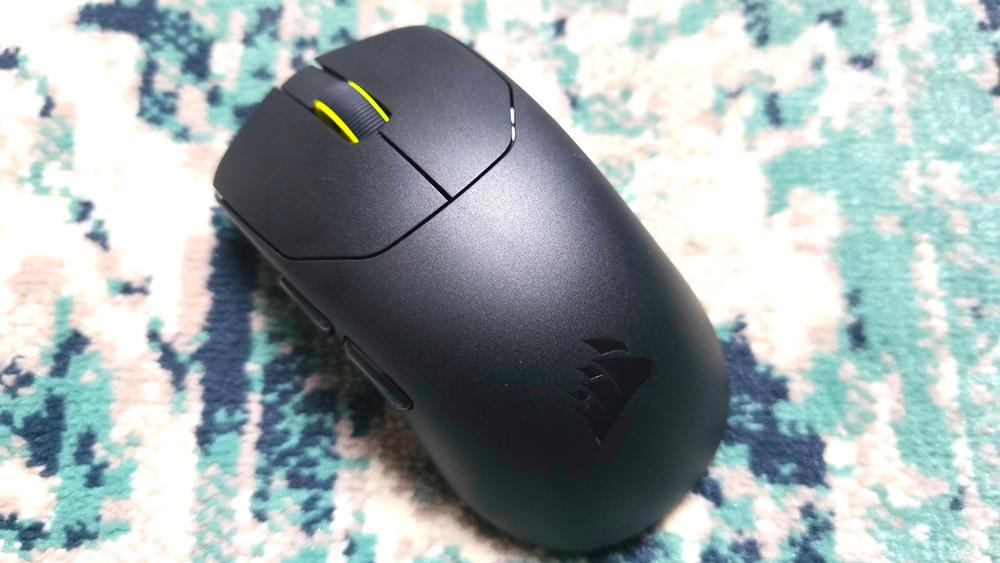
Corsair strips the Sabre V2 Pro ultralight wireless mouse back to the very basics; you get no Bluetooth connection, a relatively small battery, no DPI button and small skates on the bottom – all those weight savings means it's a mere 36g, lighter than almost any other gaming mouse. But lighter doesn't necessarily mean better, so are the compromises worth it? If performance is what you're looking for, it very much can be.
Corsair Sabre V2 Pro – Design and Shape
The Corsair Sabre V2 is a simple, sensible, symmetrical shape and will fit most hands. It's smaller than most gaming mice, and my hands are slightly larger than average, but I could hold it in a full palm grip and easily click all the buttons, without any of my fingers spilling off of its surface. That's probably due to the shape of its hump, which reaches quite far forward on the mouse before tapering off, and it therefore fills my palm well.
The matte coating is grippy and comfortable, although it does attract sweat more than most mice, and it's also harder to clean because it grabs tiny bits of dust and cleaning cloth fibre and doesn't let go. You might notice tiny dots of white in some of these pictures: those aren't scratches, they're just small bits of dust that are nearly impossible to remove without essentially scratching them off with your nail. It doesn't affect the mouse's performance, but it's annoying.
The big selling point is the mouse's weight and at 36g it is absurdly, wonderfully light. There is an unmistakable joy to the Sabre V2 Pro and when you hold it for the first time, you can't help but smile at how weightless it is. You'll find many "lightweight" mice at 50g or above: for example the HyperX Pulsefire Haste 2 Mini, which I reviewed recently and loved, is 59g, nearly double the Sabre V2 Pro, and switching between the two I immediately felt the difference. Lighter doesn't mean better, of course. Some people prefer heavier mice – I prefer lighter, and therefore loved using the Sabre V2 Pro, which feels like a true extension of my hand.
The mouse feet are relatively small and are made from Ultra-High Molecular Weight Polyethylene, aka UPE, rather than the standard Teflon (PTFE). UPE tends to glide slower but lasts longer, and while the feet were perhaps a smidge less slide-y than other feet, swishing this mouse across my cloth pad was still effortless. It comes with grip tape and larger replacement skates, if you feel you need it.
Lighter mice sometimes feel flimsy but the Sabre V2 Pro feels, generally, sturdy. When I squeeze the sides it doesn't give or creak, and there's no rattling when I shake it. There is, however, a spot on the top of the mouse where you make an indent if you press down hard. It's a bit alarming, and not something I've experienced with other mice, but it always returned to its original position and I can't imagine a scenario where you'd put that much pressure on a mouse when you were actually using it.
The side buttons – specifically the further back of the two – feels like the cheapest part of the mouse. It clicks fine, but when pressed it travels quite far into the shell, to the point where it feels like your thumb is going inside the mouse. But it wasn't a huge issue: it always returned to the right place, my clicks always registered, and the other side button was more solid. The main left and right mouse clicks are responsive and sound crisp. When I was testing them outside of a game, their pre-travel (the distance you can push the button without a click registering) was noticeable, and they felt a bit soft. But in games, they never let me down, and I could spam them with zero issues.
The scroll wheel is just fine. I personally prefer a slightly stiffer wheel than this, with more noticeable bumps for each increment, but again, it performed well, scrolling whenever I needed. The scroll wheel click, however, feels terrible. It needs a lot of force to click and when it does, it barely moves. You don't get a DPI button, but you can right click and press the back side button to switch DPI, with a coloured LED on the scroll wheel changing colour. It's a neat way of changing sensitivity without adding a button, therefore keeping the weight down.
The mouse connects to your PC via a USB dongle with a stiff cable. The dongle has a built-in clip to connect to your mousepad – a nice touch – and allows for up to 8K polling rate (more on that later). Given how light, and therefore how inherently portable, this mouse is, I would've loved a smaller USB dongle for travelling, or Bluetooth connectivity. But like with all the other caveats I've listed above – and there are quite a few – the drawbacks are worth it to keep the weight down, which is the entire point of this mouse.
Corsair Sabre V2 Pro – Performance, Gaming and Battery Life
I can't complain about the Sabre V2 Pro's gaming performance. I tested it on a variety of games, mostly Arc Raiders and Fortnite, which both require quick flicks, but also Anno 1800, which is more gentle, with lots of slow movement. Flick shots felt responsive, slow tracking felt accurate. It never stuttered and it followed my every movement exactly how I wanted. It does take some getting used to a mouse this light, and some of my flicks felt off during my first session with it, but I quickly got used to it and after a week, my other mice felt heavy in comparison.
It runs at a 1000Hz polling rate (the number of times the mouse reports its position to your PC) by default, which is fine for most players. You can run it at higher polling rates all the way up to 8000Hz, which you won't find on most other mice at this price. Higher polling rates should, in theory, improve accuracy and reduce inconsistency. In reality, most people struggle to tell the difference above 2000Hz, and to me, 2000Hz and 1000Hz feel very, very similar. Going up to 8000Hz is overkill and I wouldn't recommend it with this mouse because it tanks the battery, dropping a 70-hour maximum battery life to about 16 hours.
Even at 1000Hz, battery life is subpar. I got closer to 50 hours than 70, which lags behind other gaming mice (although I should say, several factors go into battery life so your mileage may vary). It's yet another drawback but, for me, it's yet another compromise worth having to save weight. Anything approaching 60 to 70 hours of battery life means you're charging maybe once a week, and that's fine.
Corsair Sabre V2 Pro – Software
Hooray for online mouse software! The Sabre V2 Pro doesn't make you install a new programme on your PC. Instead, you control the mouse on the Corsair's stripped-back Web Hub, and you can install it as a browser app to reach it offline if, say, you're travelling and don't know what the WiFi situation will be.
It does, admittedly, slow you down if you're mid-game and want to tweak a setting. Usually you can leave mouse software running without taxing your PC but you don't, usually, want to play with your browser running in the background, especially if you open lots of tabs or have a lower-end system. So you have to minimize the game, open your browser, navigate to the Web Hub, click on your device, and then adjust. (Also, if Corsair's servers were down, you might have difficulty adjusting your mouse settings.)
On the whole I think those drawbacks are worth it to avoid bloating your PC with even more peripheral programs – although the best of both worlds would be giving people the option to install a program, should they prefer. The Web Hub itself is intuitive, with only a few simple tabs to scroll through, although I wish that the polling rate wasn't hidden in a separate settings menu, rather than being front-and-centre in the menus alongside macros, key binds, and DPI. And the drawback of the Hub's simplicity is that it lacks features you'll get from other mice software: you can't customize lift-off distances, for example, or adjust the axis of your sensor. I would've liked a few more settings to tweak.
 What To Know About ‘Heated Rivalry’