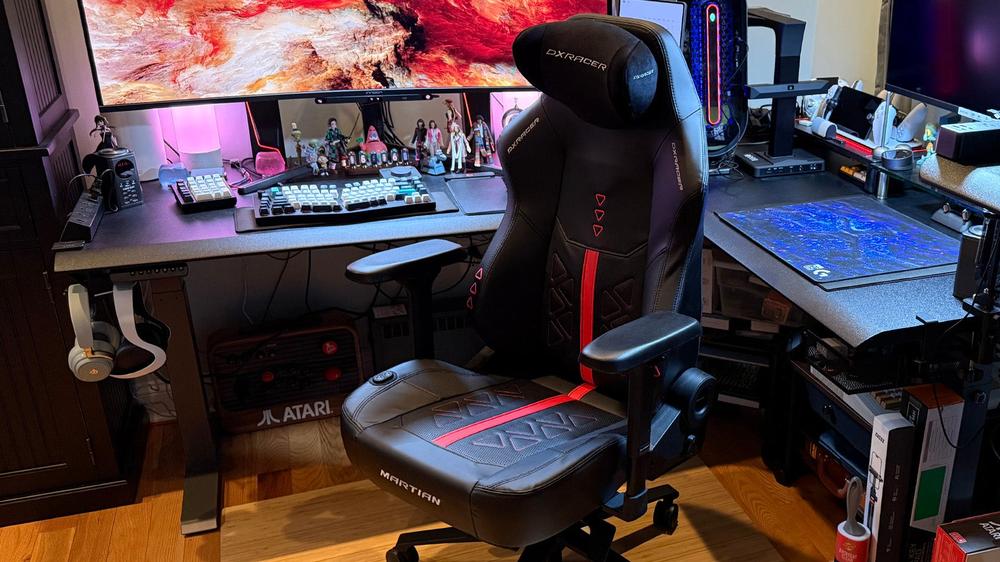
In my earlier review of the solidly built DXRacer Martian Gaming Chair, I noted that, despite featuring a few frills – such as an electric adjustable backrest and smart airbag lumbar – it mostly eschewed gimmicks. The DXRacer Martian Pro Gaming Chair, on the other hand, takes all that was good about the standard model but doubles down on the gimmicks by adding seat heating and ventilation, as well as a back massage. Although you'll only pay a few hundred dollars more for these luxuries, you're also strangely limited to a single design option, which may hurt the Martian Pro's appeal as the overall better choice among gaming chairs.
DXRacer Martian Pro – Options and Assembly
While the standard Martian features two upholstery materials and up to six different designs, the Martian Pro is only available in one upholstery material and Red Triangle. While I'm a fan of the overall design language of Red Triangle, which fits well within my red LED-heavy office workspace and PC gaming center, it would have been nice to have a few more options. On the plus side, both the Regular / L, which supports bodies shorter than 5'11" and under 275 lbs, and the Plus / XL, which supports bodies taller than 5'11" and over 275 lbs, are exactly the same price. I fit within the Regular / L range, so that's the version I'm reviewing.
All Martian Pros come with the same standard options. The electrically-powered features include a backrest adjustment between 90° - 135°, smart airbag lumbar support, three levels of seat heating, three levels of seat ventilation, and an eight-point back massage. Other, non-powered features include the usual, like seat height adjustment, a tilt lever and associated tension knob to lock or unlock a 15° seat back rocking mode, and armrests that go up and down 2.87 inches, forward and backward 1.42 inches, rotate 50°, and move left and right up to 0.94 inches.
The Martian Pro arrived in a single large box weighing 78.7 lbs, with the assembled chair itself clocking in at just over 69 lbs of that. You especially feel the weight with the backrest, since that includes the massage components. Some of the metal frame poked through two spots in the box during shipping, but thankfully, the contents were OK.
Opening the box, you're greeted with a combination Parts List, Assembly Drawing, and Quick Installation poster. There's also a QR code that links to the After-Sales Service page. A comprehensive product usage guide and care instructions round out the included paperwork.
The four major assembly steps weren't too difficult with a helper and should be doable alone if you're handy. All you need is the included combination Philips screwdriver and Allen key. All bolts and screws are already on the chair in the correct places and just need to be removed and reattached at the right time.
You basically attach the wheels to the wheel base, the backrest to the seat, connect the battery and cables, and then attach the backrest and seat to the wheel base. I did run into a few minor assembly issues along the way, however. For one, a plastic wall on one of the cable connectors somehow got bent in transit, although it was easy enough to straighten the piece so I could make the necessary wired connection. For another, the left arm was a bit too close to the side compared to the right arm, even though both were set at the factory. Fortunately, loosening the bolts on the left arm was easy, and I was able to slide it into the same approximate position as the other arm. All other fitments were spot-on, and I had no other issues.
The included AC adapter is used to charge the 5000mAh battery that's attached under the rear of the seat. As with the regular Martian, the AC adapter uses a barrel connector rather than something more universal like USB-C, so be sure not to misplace it, particularly since there's no onboard storage area for it. When charging, the AC adapter shows a red light, which turns green once charging is complete.
The Martian Pro uses the same type of removable magnetic headrest as the regular Martian. Just like with that chair's headrest, I had to use tweezers to remove the leftover strings when taking off the obnoxiously large removable tag.
DXRacer Martian Pro – Performance and Comfort
Although not quite as ergonomic or plush, I do get solid Secretlab Titan Evo vibes from the Martian Pro. It's a firm chair, but it does a good job of conforming to my body and encouraging me to sit up properly. The EPU leather (aka, faux leather) material looks premium, is cool to the touch, and easy to clean with a damp microfiber cloth. The magnetic headrest uses a fabric material.
The unpowered rocking mode and seat height adjustment levers feel kind of cheap. I'd love something more substantial that I don't feel like I'm going to break in future Martian revisions. By contrast, the powered adjustments feel good and work well.
On the right side of the chair is a four-position direction pad. Pushing the front and rear (left and right) buttons increases or decreases, respectively, both of the upper and lower lumbar supports. Pushing the top button (up) increases the depth of the upper lumbar support. Pushing the bottom button (down) increases the depth of the lower lumbar support. The ability to independently adjust each lumbar airbag is a nice touch, although it does require some trial and error for best results.
On the left of the chair is a powered backrest adjustment lever. Although you can't see it when sitting, the yellow LED lights behind the logos above the lever and direction pad light up when you tilt the backrest backwards. It's a pretty smooth motion, but it does take about 20 seconds to move all the way in either direction.
Pressing and holding the M button on the direction pad for two seconds turns the 10-minute massage function on or off. When on, pressing the M key again switches the massage modes between different levels of pulse, continuous, wave, normal, auto, or mixed functionality. I would have liked a more intuitive way to switch between the six massage modes, but I'm glad that there's versatility with the settings.
Thanks to a pair of four circular massage zones along the height of the backrest, the massage effect is pretty good. While I don't find it nearly as effective as the dramatic lumbar stretch that the LiberNovo Omni provides, it's still my second-favorite office or gaming chair massage feature to date. Thanks to the orientation of the massage zones, I feel it from my lower back to just below my shoulder blades.
Although not quite as deep or impactful, the massage points pressing against my back remind me of a knuckle massage. It's noticeable enough without getting anywhere near discomfort. The closest analog is probably that of a gentle shiatsu massage.
With all that tech in the backrest, you might think it would be uncomfortable, but DXRacer did a fantastic job with the cushioning. I only ever noticed the massage points when I activated the massage functionality. The backrest itself doesn't track your back as the LiberNovo Omni does, but that's OK, as it still takes a thoughtful ergonomic approach with how the chair wraps around you.
There are two dedicated buttons, one for ventilation (cooling) and one for heat, on the right of the seat cushion. Both ventilation and heating have three levels to choose from, which, unlike the massage modes, are clearly indicated with one to three blue or red lights, respectively. The entire middle area of the seat cushion has both ventilation and heating elements, so coverage is excellent. While you hear the fan with ventilation turned on, the heating element is noiseless. Along with the massage, the ventilation and heating elements are stand-out features that are seamlessly integrated into the chair's design.
The armrests are nicely adjustable with a slight give to the firm cushioning. More importantly, they mostly stay in place once set. And while the wheels aren't single-blade casters, they still roll quite smoothly.
Runtime from the 5000mAh battery varies a lot depending on which features you’re using. It takes about three hours to fully charge from empty, and you can use the chair while it's plugged in. If you use the electric functions sparingly, you can squeeze up to two weeks between charges. Continuous heavy usage, however, might get you only one day, particularly if you use the heating element a lot.
I have occasionally come back to a dead chair after, say, a week of non-use, so I don't think standby time is very good. When the battery has no charge, all electric functions stop working, including the recline and lumbar adjustments. With no way to manually recline the chair, it's important to make sure you keep the AC adapter nearby if you find yourself making regular adjustments.
 La tempesta perfetta: l’IA sta uccidendo i PC desktop e prepara la strada per il computer in abbonamento