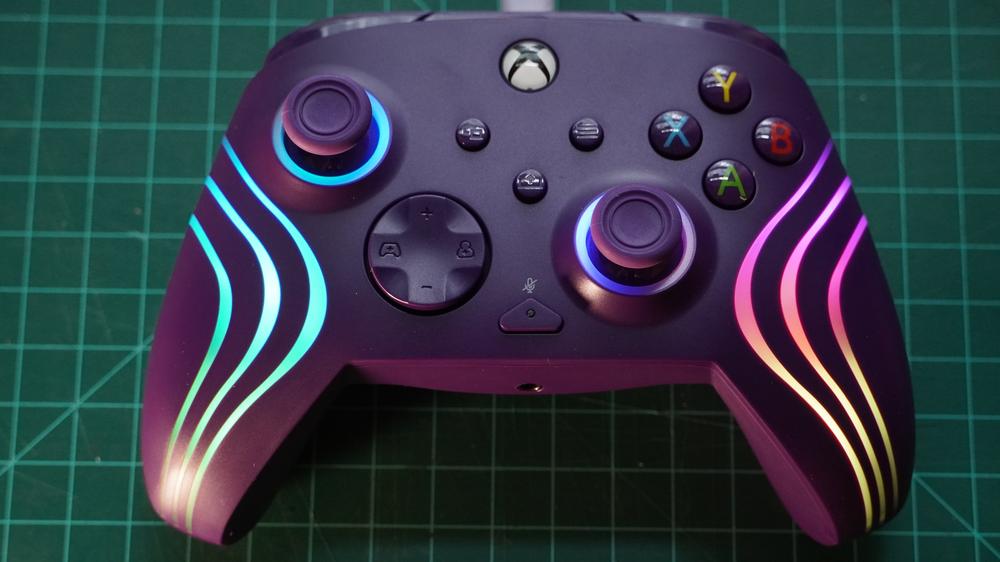
If you’re looking for a cheap Xbox controller that goes a bit beyond the basics, the Turtle Beach Afterglow Wave might be tempting. Its $49 price tag is on the low side, yet it tacks on RGB lighting, remappable extra buttons and Hall Effect technology, like some of the best Xbox controllers on the market. But behind that initial interest, there's unfortunately little that distinguishes the Afterglow Wave. And though $49 is less than a first-party Xbox controller at MSRP, there are plenty of deals on Microsoft’s controller, and even more third-party alternatives that do more to set themselves apart.
Turtle Beach Afterglow Wave – Design and Features
The Turtle Beach Afterglow Wave is, by all accounts, a fairly standard wired Xbox controller at first glance. It has the same control layout, roughly the same size face buttons, and the Xbox button is prominently placed at the center of the controller in a style that stands out from the bold colors elsewhere. It doesn’t have the bulging shoulders of the Xbox controller though, instead sporting a flat profile along its front edge like the PowerA Enhanced controller.
The Afterglow Wave also has a few extras to stand apart from that well-known first-party option. On its back, it includes trigger locks to shorten the analog trigger travel distance, providing three different levels. It also has two large paddle buttons for your middle or ring fingers that can be remapped to different inputs, giving you access to controls with fingers that would otherwise be doing nothing while gaming. There’s also a microphone mute switch on the face of the controller, while the d-pad has audio volume and chat mix settings baked in as secondary controls.
Then there’s the eight-zone RGB lighting. The controller has three wavy lines running up each side and translucent rings around the joysticks. Both joysticks have a lighting zone and there are three more zones per side. Counterintuitively, the three lines on each side aren’t separate zones. Rather, the lines have a bottom, middle, and top lighting zone. How distinct each zone appears depends heavily on color, too. For instance, yellow gets washed out by blue quite easily. The side stripes look decent, but the joystick rings are lit from one corner, so whatever color you choose will only show partially, and some color from the sides zones will blend in.
Beyond all this, the controller is rather mundane. There’s little about the physical design of the controller that stands out. The handgrips have a wavy grid texture, but aren’t rubberized in any way. The joysticks have little texture either, aside from a raised rubber circle nestled inside the top of each.
Turtle Beach Afterglow Wave – Software
The Turtle Beach Afterglow Wave supports customization through one of Turtle Beach’s many software packages. In this case, it’s the PDP Control Hub, available in the Microsoft Store on PC or on Xbox. This provides plenty of customization for different elements of the controllers, though it’s not laid out sensibly or even explained all that well.
You can remap each control on the controller, for instance, but you do so by selecting each control from a drop-down menu and then choosing the new control from a second drop-down menu. This is horribly tedious compared to clicking on the control on the picture of the controller and then pressing the control you want on the plugged-in controller. The screen where you do the remapping also is separate from the screen that shows you all the remapping you’ve done.
You do get some surprising options, though. You can swap the roles of the joysticks and triggers. You can also introduce mic monitoring for a connected headset through the app.
There are a handful of RGB customization, with color selections and effects. The software also lets you save four separate lighting profiles. But on the note of profiles, the controller doesn’t let you create multiple profiles for all the other customizations, which is a huge letdown if you plan on playing lots of different types of games and like to tweak things for each.
Turtle Beach Afterglow Wave – Gaming and Performance
While it might have panache thanks to its RGB lighting, the Turtle Beach Afterglow Wave is otherwise fairly unremarkable when it comes to performance. Hall Effect triggers may be nice over the long haul, as they ought to remain accurate, but I’ve had little issue with normal analog triggers in the past. Joystick drift tends to be a more common issue that Hall Effect tech helps sort out, but Turtle Beach didn’t opt for Hall Effect thumbsticks.
There are a couple nods to performance with the two custom buttons on the underside of the controller and the adjustable trigger locks. A few years ago, that would have been a slightly exciting inclusion - but these features are now almost table stakes for all but the most basic third-party controllers. Turtle Beach is at least providing them rather cheaply, but that cost-cutting is unfortunately quite evident.
There's no other way to say it - the Turtle Beach Afterglow Wave just feels kind of cheap. Most of the buttons are quite basic, with no special switches underneath. I can mash away at them, and they do the job, but they feel just like stiff plastic, far from an upgrade over a stock Xbox controller. The d-pad lacks texture and also doesn’t have a very pronounced actuation, making it feel just that little bit more nebulous than I’d like from an input device. The texture of the thumbsticks is incredibly unsatisfying, lacking grip while simultaneously roughing up my fingertips.
The rumble motors at least feel decent. Two provide heavy rumbles, while two more “impulse” motors provide more subtle high-frequency vibration. The rumble is strong enough that it’ll bounce the controller around on a table if you set it down during a game cutscene.
The shoulder buttons are perhaps the best feeling, next to the triggers, with a more clicky feel, but even they are a little off. They actually move like a little lever, so to hit them, you need to tap the outside edge. This makes for an inconsistent response depending on where you put your finger. And if you go up too far on the button, pressing will simply do nothing – not what you want.
And all of this functionality is coming over a wired connection. For $29, you can get a similarly competent 8BitDo Ultimate 2C controller with many of the same capabilities, plus wireless connectivity, Hall Effect joysticks and triggers, and cute colors – you just won’t get RGB lighting or official Xbox support.
 Ghost of Yotei Gets Its First Major Discount for PS5